What is a VPN? It’s a question many people ask when they want better online privacy or need a secure way to browse the internet. A Virtual Private Network (VPN) creates an encrypted connection between your device and the internet, helping protect your data from unauthorized access while you’re online.
Whether you’re working remotely, using public Wi-Fi, or simply looking to improve your online privacy, a VPN can be a valuable tool. However, it’s important to understand what a VPN can and cannot do before deciding to use one.
This guide explains how VPNs work, their advantages, common use cases, and some misconceptions that often surround them.
What Is a VPN?
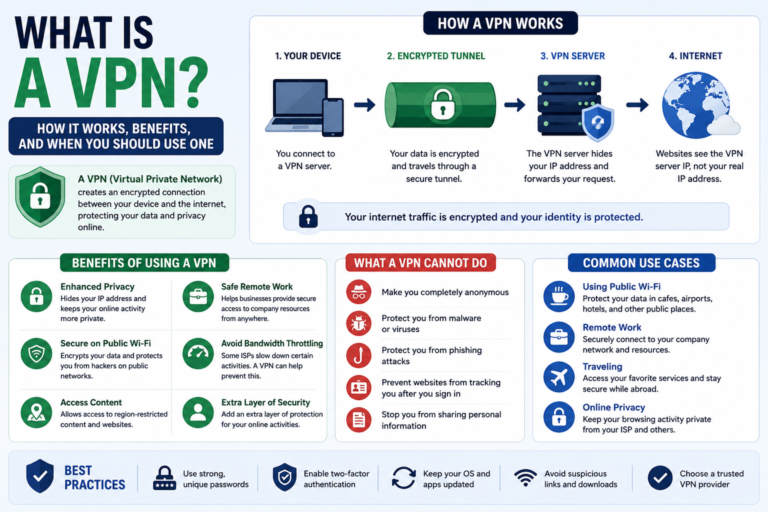
A Virtual Private Network (VPN) is a service that encrypts your internet connection and routes your online traffic through a secure server operated by the VPN provider.
Instead of connecting directly to a website, your device first connects to the VPN server. The VPN server then forwards your request to the website and sends the response back to you.
This process helps protect your internet traffic from interception and can make it more difficult for others to monitor your online activity.
How Does a VPN Work?
Without a VPN, your device communicates directly with websites and online services through your internet service provider (ISP).
When you enable a VPN, the process changes:
- You connect to a VPN server.
- The VPN encrypts your internet traffic.
- Your encrypted data travels through a secure tunnel.
- The VPN server communicates with websites on your behalf.
- The requested information returns through the encrypted connection.
Because your data is encrypted while in transit, it becomes much harder for unauthorized parties to read it if intercepted.
What Does a VPN Do?
A VPN offers several important privacy and security benefits.
- Encrypts your internet connection.
- Helps protect your data on public Wi-Fi.
- Masks your IP address from the websites you visit.
- Reduces the amount of information that can be observed by others on the same network.
- Adds an extra layer of privacy when browsing online.
The exact features available depend on the VPN provider and may change over time as services evolve.
When Should You Use a VPN?
While you don’t need a VPN for every online activity, there are situations where it can significantly improve your privacy and security.
Using Public Wi-Fi
Public Wi-Fi networks in cafés, airports, hotels, and shopping centers can expose users to additional security risks. A VPN encrypts your connection, making it much more difficult for attackers on the same network to intercept your data.
Working Remotely
Many businesses require employees to use a VPN when accessing company systems from outside the office. This helps protect sensitive business information during transmission.
Protecting Personal Privacy
A VPN can help reduce the amount of information visible to third parties by masking your IP address and encrypting your internet traffic.
Traveling Abroad
Travelers often use VPNs to access services securely while connected to unfamiliar networks. Availability of online services may vary depending on local laws and provider policies.
What Information Does a VPN Hide?
A VPN helps protect several aspects of your online activity, but it does not make you completely anonymous.
Depending on the service and your browsing habits, a VPN can help hide:
- Your public IP address from websites.
- Your internet traffic from others on the same local network.
- Some browsing activity from your ISP while data is encrypted in transit.
- Your physical location as inferred from your IP address.
However, websites you log into can still identify you through your account, and VPNs do not prevent tracking based on information you voluntarily provide.
Common Types of VPNs
Personal VPN
These services are designed for individual users who want to improve privacy and security while browsing the internet.
Business VPN
Organizations use business VPNs to provide employees with secure remote access to internal company resources.
Site-to-Site VPN
Large organizations often connect multiple office locations using site-to-site VPNs, allowing secure communication between different networks.
Benefits of Using a VPN
Using a VPN can improve your online security and privacy in several ways. While the exact experience depends on the VPN provider and your internet connection, these are some of the most common benefits.
Better Privacy
A VPN masks your public IP address from the websites you visit. This makes it more difficult for third parties to associate your browsing activity with your internet connection.
Improved Security on Public Networks
Public Wi-Fi networks are convenient, but they can also expose users to security risks. A VPN encrypts your connection, helping protect sensitive information such as passwords and personal data while you browse.
Safer Remote Work
Many organizations rely on VPNs to give employees secure access to internal systems. Encryption helps reduce the risk of unauthorized access when employees connect from home or while traveling.
Protection for Sensitive Activities
Whenever you access online banking, cloud storage, or business applications on unfamiliar networks, a VPN adds an additional layer of protection for your internet traffic.
What a VPN Cannot Do
Many people assume a VPN solves every online privacy problem, but that isn’t the case. Understanding its limitations helps you use it more effectively.
A VPN does not:
- Make you completely anonymous online.
- Protect you from phishing attacks.
- Remove viruses or malware from your device.
- Replace antivirus software.
- Prevent websites from tracking you after you sign in.
- Stop you from sharing personal information voluntarily.
Think of a VPN as one part of your overall cybersecurity strategy rather than a complete security solution.
VPN vs Proxy: What’s the Difference?
VPNs and proxy servers both route internet traffic through another server, but they serve different purposes.
| Feature | VPN | Proxy |
|---|---|---|
| Encrypts internet traffic | Yes | Usually No |
| Protects the entire device | Yes | Often browser or application only |
| Improves security on public Wi-Fi | Yes | Limited |
| Masks your IP address | Yes | Yes |
If your primary goal is security and privacy, a VPN generally provides more comprehensive protection than a basic proxy server.
Does a VPN Slow Down Your Internet?
It can. Because your internet traffic passes through an encrypted connection and an additional server, you may notice a slight reduction in speed.
However, many modern VPN providers operate high-speed server networks that minimize performance impacts. Actual speeds depend on factors such as your internet connection, server location, network congestion, and the VPN protocol being used.
How to Choose a VPN
Not every VPN service offers the same level of performance or privacy. Before choosing a provider, consider these factors:
- Clear privacy policy.
- Strong encryption standards.
- Large and reliable server network.
- Apps for your devices.
- Regular software updates.
- Responsive customer support.
- Independent security audits, where available.
Features and pricing vary between providers, so review the latest information before subscribing.
Best Practices When Using a VPN
A VPN works best when combined with good cybersecurity habits.
- Keep your operating system updated.
- Enable Two-Factor Authentication (2FA).
- Use strong, unique passwords.
- Install security updates promptly.
- Avoid clicking suspicious links.
- Use trusted antivirus software.
- Disconnect from VPN servers you no longer need.
These practices provide broader protection than relying on a VPN alone.
Frequently Asked Questions
Is using a VPN legal?
VPNs are legal in many countries, but laws differ around the world. Always check the regulations in your location before using one.
Can a VPN hide my browsing activity completely?
No. A VPN encrypts your internet connection and masks your IP address, but websites can still recognize you if you sign in to your accounts or share personal information.
Do I need a VPN at home?
Many people use VPNs at home for additional privacy, but whether you need one depends on your browsing habits, security requirements, and personal preferences.
Can I use a VPN on my phone?
Yes. Most major VPN providers offer applications for Android and iPhone devices, as well as Windows, macOS, and Linux computers.
Conclusion
What is a VPN? A Virtual Private Network is a tool that encrypts your internet connection and routes your traffic through a secure server, helping improve privacy and protect your data while you’re online.
Although a VPN cannot make you completely anonymous or replace other security tools, it plays an important role in protecting your information, especially when using public Wi-Fi or accessing sensitive accounts. Combined with strong passwords, Two-Factor Authentication, and safe browsing habits, a VPN can become an important part of your overall online security strategy.
VPN features, privacy policies, and supported platforms may change over time, so it’s always a good idea to review the latest information before choosing a provider.