A password manager helps you create, store, and manage strong passwords for your online accounts. Instead of remembering dozens of complex passwords, you only need to remember one secure master password to access your password vault.
As people use more online services for banking, shopping, work, and social media, managing passwords has become increasingly difficult. Reusing the same password across multiple websites may seem convenient, but it significantly increases your security risk if one account is compromised.
This guide explains what a password manager is, how it works, its advantages, potential limitations, and why cybersecurity experts recommend using one.
What Is a Password Manager?
A password manager is software that securely stores your usernames, passwords, and other login information in an encrypted vault.
Instead of writing passwords in notebooks or saving them in plain text files, a password manager encrypts your data and protects it with a single master password or another secure authentication method.
Many password managers also generate strong, unique passwords for every account, reducing the risk associated with password reuse.
Why Do You Need a Password Manager?
Most people have dozens—or even hundreds—of online accounts. Remembering a unique, complex password for each one is almost impossible without help.
As a result, many users make common mistakes such as:
- Reusing the same password across multiple websites.
- Choosing short or predictable passwords.
- Writing passwords on paper or sticky notes.
- Saving passwords in unsecured documents.
A password manager helps eliminate these habits by securely storing your credentials and making them easy to access when needed.
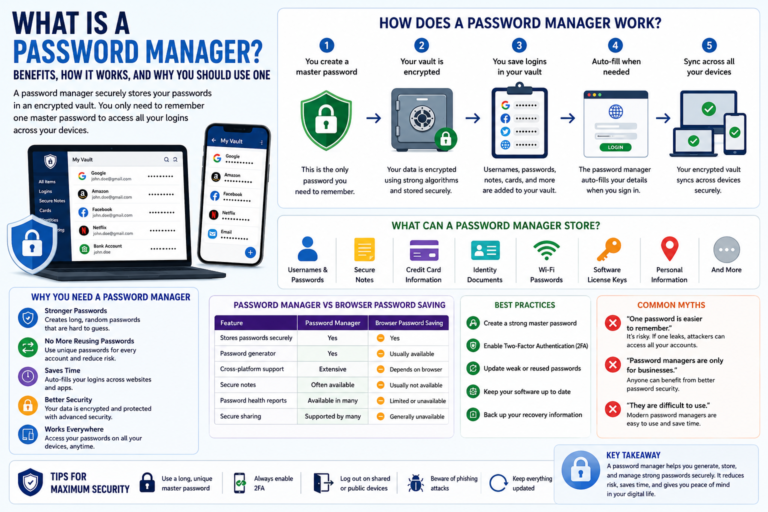
How Does a Password Manager Work?
Although password managers use advanced encryption behind the scenes, the user experience is straightforward.
- You create a secure master password.
- The password manager creates an encrypted vault.
- You save your login credentials inside the vault.
- The password manager automatically fills in usernames and passwords when you visit supported websites.
- Your passwords remain encrypted while stored.
Many password managers also synchronize your encrypted vault across multiple devices, allowing you to access your passwords on your computer, smartphone, and tablet.
What Can a Password Manager Store?
Modern password managers can store more than just passwords.
- Usernames
- Passwords
- Secure notes
- Credit card information
- Identity documents
- Wi-Fi passwords
- Software license keys
- Personal addresses
The available features vary between providers and may change over time as new versions are released.
Benefits of Using a Password Manager
Creates Strong Passwords
Most password managers include a built-in password generator that creates long, random passwords that are difficult to guess.
Prevents Password Reuse
Using different passwords for every website reduces the impact of data breaches. If one password is compromised, your other accounts remain protected.
Saves Time
Auto-fill features allow you to sign in quickly without manually typing usernames and passwords every time.
Improves Security
Encrypted password storage offers significantly better protection than saving passwords in spreadsheets, notes, or browsers without additional security.
Works Across Multiple Devices
Many password managers synchronize your encrypted vault across Windows, macOS, Android, iPhone, and web browsers, making passwords available wherever you need them.
Are Password Managers Safe?
When used correctly, reputable password managers provide strong protection for your credentials through encryption and modern security practices.
However, no security tool is perfect. Your overall security still depends on choosing a strong master password, enabling Two-Factor Authentication (2FA), and keeping your devices updated.
Features, encryption methods, and security options vary by provider, so review the latest information before selecting a password manager.
Types of Password Managers
Cloud-Based Password Managers
These services store your encrypted password vault online and synchronize it across your devices.
Local Password Managers
Local password managers keep your encrypted vault on your own device instead of storing it in the cloud.
Browser-Based Password Managers
Most modern browsers offer built-in password saving features. While convenient, their capabilities and security features may differ from dedicated password management applications.
Password Manager vs Browser Password Saving
Many web browsers can save your passwords, making it easy to sign in to websites. While this feature is convenient, dedicated password managers often provide additional security features and account management tools.
| Feature | Password Manager | Browser Password Saving |
|---|---|---|
| Stores passwords securely | Yes | Yes |
| Password generator | Yes | Usually available |
| Cross-platform support | Extensive | Depends on the browser |
| Secure notes | Often available | Usually not available |
| Password health reports | Available in many password managers | Limited or unavailable |
| Secure sharing | Supported by many providers | Generally unavailable |
Both options can improve password management, but dedicated password managers typically offer more features for users with many online accounts.
How to Choose a Password Manager
Before selecting a password manager, compare its features, security practices, and compatibility with your devices.
Consider the following factors:
- Strong encryption for stored passwords.
- Support for Two-Factor Authentication (2FA).
- Availability on your operating systems and browsers.
- Automatic password generation.
- Secure synchronization across devices.
- Recovery options if you forget your master password.
- Regular software updates and active development.
Providers regularly introduce new features, so review the latest documentation before choosing a service.
Best Practices for Using a Password Manager
A password manager is most effective when combined with good cybersecurity habits.
Create a Strong Master Password
Your master password protects every account stored inside your vault. Choose a long, unique password that you do not use anywhere else.
Enable Two-Factor Authentication
If your password manager supports 2FA, enable it. This adds another layer of protection if someone learns your master password.
Update Weak Passwords
Many password managers identify weak, reused, or compromised passwords. Take time to replace them with stronger alternatives.
Keep Your Software Updated
Install updates for your password manager, operating system, and browser to receive the latest security improvements.
Back Up Recovery Information
Many password managers provide emergency recovery methods or recovery codes. Store them securely so you can regain access if needed.
Common Myths About Password Managers
Myth 1: One Password Is Easier to Remember
Using one password everywhere may seem convenient, but it creates a significant security risk. If one account is compromised, attackers may try the same password on your other accounts.
Myth 2: Password Managers Are Only for Businesses
Individuals, students, families, and professionals can all benefit from using a password manager to organize and protect their online accounts.
Myth 3: Password Managers Are Difficult to Use
Modern password managers are designed for everyday users. Most provide browser extensions and mobile apps that simplify saving and filling passwords.
Frequently Asked Questions
Can a password manager generate strong passwords?
Yes. Most password managers include a password generator that creates long, random, and unique passwords for each account.
Can I use a password manager on my phone?
Yes. Many providers offer apps for Android and iPhone, along with software for Windows, macOS, Linux, and popular web browsers.
What happens if I forget my master password?
Recovery options depend on the provider. Some services offer recovery keys or emergency access features, while others may not be able to recover encrypted vaults for security reasons.
Should I still enable Two-Factor Authentication?
Absolutely. A password manager and Two-Factor Authentication work together to provide stronger account protection than either solution alone.
Conclusion
A password manager makes it easier to create, store, and manage strong passwords without relying on memory or insecure storage methods. By generating unique passwords for every account and protecting them with encryption, it reduces many of the risks associated with password reuse and weak credentials.
Although choosing the right password manager depends on your personal needs, using one alongside strong cybersecurity habits, regular software updates, and Two-Factor Authentication can significantly improve your online security. As features evolve over time, review your chosen provider’s latest documentation to take advantage of new capabilities and security improvements.