Phishing emails are one of the most common cyber threats today. They are designed to trick people into revealing sensitive information such as passwords, banking details, credit card numbers, or personal data. While many phishing attempts are easy to identify, others are carefully crafted to look like legitimate emails from trusted companies.
Cybercriminals continuously improve their tactics, making phishing attacks more convincing than ever. Learning how to recognize suspicious emails can help protect your personal information, finances, and online accounts.
This guide explains what phishing emails are, how they work, the warning signs to watch for, and what to do if you receive one.
What Are Phishing Emails?
Phishing emails are fraudulent messages that pretend to come from legitimate organizations, businesses, banks, government agencies, or even people you know. Their goal is to convince you to click a malicious link, download an infected attachment, or share confidential information.
Instead of breaking into your accounts directly, attackers rely on deception. They create a sense of urgency or trust to persuade victims to act without carefully examining the email.
For example, you might receive an email claiming your bank account has been locked and asking you to verify your identity immediately. Clicking the provided link could lead to a fake website designed to steal your login credentials.
How Do Phishing Emails Work?
Most phishing attacks follow a similar pattern.
- The attacker sends a convincing email.
- The email appears to come from a trusted source.
- The message creates urgency or fear.
- You click a link or open an attachment.
- The attacker steals your information or installs malware.
Some phishing campaigns target thousands of people, while others are carefully customized for a specific individual or organization.
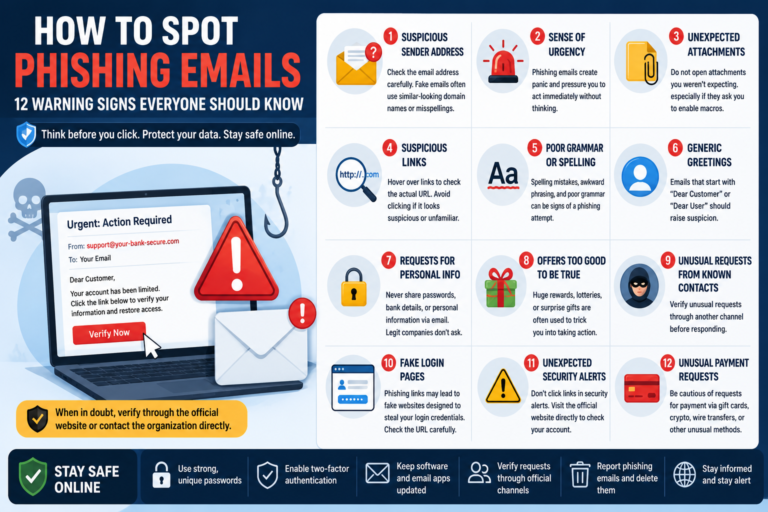
12 Warning Signs of a Phishing Email
1. The Sender’s Email Address Looks Suspicious
Always check the sender’s email address instead of relying only on the display name. Attackers often use addresses that closely resemble legitimate ones by changing a single letter or adding extra characters.
For example, an email appearing to come from a bank may actually originate from an unrelated domain.
2. The Email Creates a Sense of Urgency
Many phishing emails pressure you to act immediately using messages such as:
- Your account will be suspended.
- Your payment has failed.
- Your password expires today.
- Immediate action is required.
Creating panic reduces the chance that you’ll carefully verify the message.
3. Unexpected Attachments
Be cautious if an email includes an attachment you weren’t expecting, especially if it asks you to enable macros or download software.
Malicious attachments may contain malware or ransomware that can infect your device.
4. Suspicious Links
Never assume a link goes where it claims.
Before clicking, hover your mouse over the link on a desktop computer to preview its destination. On mobile devices, many email apps allow you to preview links by pressing and holding them.
If the destination looks unrelated to the company, avoid clicking it.
5. Poor Grammar or Spelling
Many phishing emails contain awkward wording, unusual formatting, or spelling mistakes. While attackers have improved their writing in recent years, obvious language errors can still be a warning sign.
6. Generic Greetings
Legitimate companies often address customers by name.
Messages beginning with phrases like “Dear Customer” or “Dear User” are not always fraudulent, but they deserve extra attention, especially when combined with other warning signs.
7. Requests for Personal Information
Reputable organizations generally do not ask you to send passwords, banking details, verification codes, or credit card numbers by email.
If an email requests sensitive information, verify the request through the organization’s official website or customer support channels instead of replying directly.
8. Offers That Sound Too Good to Be True
If an email claims you’ve won a prize, inherited money, or qualified for an exclusive reward that you never applied for, treat it with caution.
Scammers often use exciting offers to encourage people to click links or provide personal information. If an offer seems unusually generous or unexpected, verify it through the company’s official website before taking any action.
9. Unusual Requests from Someone You Know
Attackers sometimes compromise legitimate email accounts and use them to target friends, family members, or coworkers.
If someone you know suddenly asks for money, gift cards, passwords, or confidential information, confirm the request using another method such as a phone call or a messaging app.
10. Fake Login Pages
Many phishing emails direct users to websites that closely resemble legitimate login pages. These fake pages are designed to collect usernames and passwords.
Before entering your credentials, check the website address carefully. Even a small difference in the domain name can indicate a fraudulent website.
11. Unexpected Security Alerts
You may receive an email claiming someone has logged into your account or that unusual activity has been detected.
Instead of clicking the provided link, open your browser and visit the company’s official website directly. Then sign in and review your account activity from there.
12. Requests for Payment Using Unusual Methods
Scammers often ask victims to pay using gift cards, cryptocurrency, wire transfers, or other payment methods that are difficult to reverse.
Legitimate businesses rarely request payment through these methods for routine transactions.
What Should You Do If You Receive a Phishing Email?
If you suspect an email is fraudulent, stay calm and avoid interacting with it.
- Do not click any links.
- Do not download attachments.
- Do not reply to the email.
- Report the message as phishing if your email provider offers that option.
- Delete the email after reporting it.
If the email appears to come from a company you use, contact the company through its official website or customer support rather than using the contact details provided in the suspicious email.
What If You Already Clicked a Phishing Link?
Accidents happen, and acting quickly can reduce potential damage.
- Disconnect from the website if it appears suspicious.
- Change the password for the affected account immediately.
- Change the same password on any other accounts where you reused it.
- Enable Two-Factor Authentication (2FA) if it isn’t already active.
- Run a security scan using trusted antivirus software.
- Monitor your accounts for unusual activity.
If you entered banking or payment information, contact your financial institution as soon as possible for guidance.
How to Protect Yourself from Phishing Emails
Good security habits significantly reduce the risk of becoming a phishing victim.
- Use strong, unique passwords for every account.
- Enable Two-Factor Authentication (2FA).
- Keep your operating system and browser updated.
- Install security updates promptly.
- Avoid clicking links in unexpected emails.
- Verify requests through official channels.
- Use reputable antivirus and email security software.
Remember that technology alone cannot stop every phishing attack. Staying alert remains your best defense.
Common Myths About Phishing Emails
Myth 1: Only Large Companies Are Targeted
Individuals, small businesses, schools, and nonprofit organizations all receive phishing emails. Attackers often target anyone they believe may respond.
Myth 2: Spam Filters Catch Everything
Email providers block millions of phishing messages every day, but no spam filter is perfect. Some malicious emails still reach users’ inboxes.
Myth 3: Phishing Emails Always Look Fake
Modern phishing campaigns can closely imitate legitimate emails using professional branding, convincing language, and realistic layouts. Always verify before trusting an unexpected message.
Frequently Asked Questions
Can phishing emails infect my computer?
Yes. Some phishing emails contain malicious attachments or links that may install malware if opened.
How can I tell if a website is fake?
Check the website address carefully, look for spelling errors in the domain name, and avoid entering personal information if anything seems unusual.
Should I reply to a phishing email?
No. Replying confirms that your email address is active and may encourage further phishing attempts.
Are mobile users at risk?
Yes. Phishing attacks target smartphones as well as computers. Smaller screens can make suspicious links and email addresses harder to inspect, so extra caution is important.
Conclusion
Phishing emails continue to be one of the most common methods cybercriminals use to steal sensitive information. While attackers constantly refine their techniques, many phishing attempts still reveal warning signs such as suspicious email addresses, unexpected attachments, urgent requests, and fake login pages.
Taking a few extra moments to verify an email before clicking a link or downloading a file can prevent serious security problems. By understanding how phishing emails work and following good online security practices, you can greatly reduce your risk of becoming a victim and keep your personal information safe.