What is cloud computing? It’s a question many people ask when they hear terms like cloud storage, cloud servers, or cloud applications. Simply put, cloud computing allows you to access computing services such as storage, software, databases, and processing power over the internet instead of relying entirely on your local computer.
Today, millions of people use cloud computing every day without even realizing it. Whether you’re storing photos online, streaming movies, backing up your phone, or collaborating on documents with coworkers, you’re likely using cloud-based services.
This guide explains what cloud computing is, how it works, its different types, advantages, limitations, and why it has become an essential part of modern technology.
What Is Cloud Computing?
Cloud computing is the delivery of computing resources over the internet. Instead of purchasing and maintaining your own physical servers, organizations and individuals can access storage, software, networking, databases, and computing power whenever they need them.
The term “cloud” refers to remote data centers that host these services. Users connect to these resources through the internet without needing to know where the servers are physically located.
This approach allows businesses and individuals to use technology on demand while reducing the need to manage complex hardware.
How Does Cloud Computing Work?
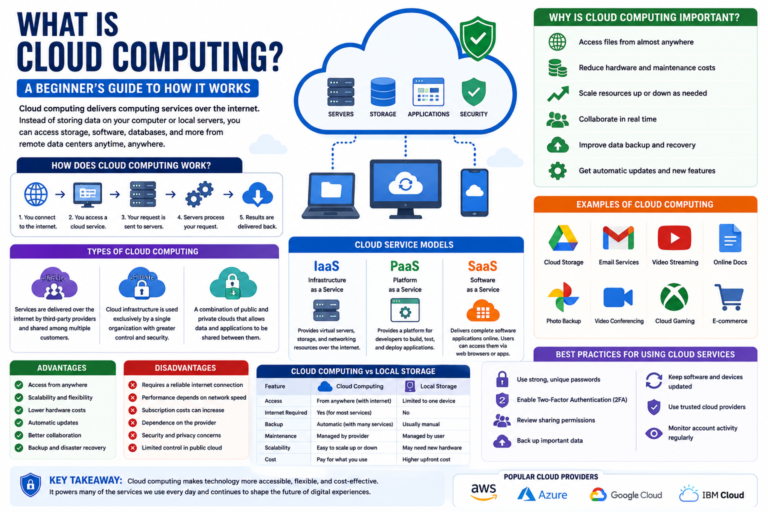
Cloud computing works by connecting your device to remote servers through the internet.
When you upload a file, open a cloud-based application, or save data online, your information is processed or stored on servers located in professional data centers instead of your personal computer.
Your device acts as the interface, while the cloud provider manages the infrastructure behind the scenes.
- You connect to the internet.
- You access a cloud service through an app or web browser.
- Your request is sent to remote servers.
- The servers process your request.
- The results are delivered back to your device.
Why Is Cloud Computing Important?
Cloud computing has transformed how people use technology by making powerful computing resources available on demand.
Some of the key benefits include:
- Access files from almost anywhere.
- Reduce hardware costs.
- Scale resources when needed.
- Collaborate in real time.
- Improve data backup and recovery.
- Receive automatic software updates for many cloud services.
These advantages have made cloud computing an essential technology for businesses, students, developers, and everyday users.
Types of Cloud Computing
Public Cloud
Public cloud services are operated by third-party providers and shared among multiple customers. Users access computing resources through the internet while the provider manages the infrastructure.
Private Cloud
A private cloud is dedicated to a single organization. It provides greater control over infrastructure and security but typically requires more management.
Hybrid Cloud
A hybrid cloud combines public and private cloud environments, allowing organizations to move workloads between them based on their needs.
Common Cloud Computing Services
Cloud providers offer different service models depending on what users need.
Infrastructure as a Service (IaaS)
IaaS provides virtual servers, networking, and storage resources that customers can configure and manage.
Platform as a Service (PaaS)
PaaS provides a development environment where developers can build, test, and deploy applications without managing the underlying hardware.
Software as a Service (SaaS)
SaaS delivers complete software applications through the internet. Users simply sign in and use the application without installing or maintaining the software themselves.
Examples of Cloud Computing
Cloud computing supports many of the online services people use every day.
- Cloud file storage.
- Online email services.
- Video streaming platforms.
- Online office applications.
- Photo backup services.
- Video conferencing tools.
- Online gaming services.
Although the specific features vary by provider, these services all rely on cloud infrastructure to deliver content and applications over the internet.
Advantages of Cloud Computing
Cloud computing offers several benefits that make it attractive for both individuals and businesses. The exact advantages depend on the cloud service you use, but many users experience greater flexibility and convenience.
Access from Anywhere
As long as you have an internet connection, you can access your cloud-based files and applications from multiple devices, including laptops, smartphones, and tablets.
Scalability
Cloud services allow businesses to increase or decrease computing resources as their needs change. This flexibility helps organizations avoid purchasing more hardware than they require.
Lower Hardware Costs
Instead of buying and maintaining expensive servers, many organizations pay only for the cloud resources they use.
Automatic Updates
Many cloud applications receive regular updates from the provider, reducing the need for users to install software manually.
Improved Collaboration
Cloud-based applications make it easier for multiple people to work on the same documents, projects, or files in real time.
Backup and Disaster Recovery
Many cloud services include backup and recovery features that help reduce data loss if a device fails or is replaced.
Disadvantages of Cloud Computing
Although cloud computing provides many advantages, it also has limitations that users should understand.
- Requires a reliable internet connection for many services.
- Performance may depend on network speed.
- Subscription costs can increase over time.
- Users depend on the provider’s availability and infrastructure.
- Privacy and compliance requirements vary depending on the service.
Understanding these trade-offs helps individuals and organizations choose cloud solutions that fit their needs.
Cloud Computing vs Local Storage
Cloud storage and local storage both have their advantages. Choosing between them depends on how you access and manage your files.
| Feature | Cloud Computing | Local Storage |
|---|---|---|
| Accessible from multiple devices | Yes | Usually limited to one device |
| Requires internet for most online features | Yes | No |
| Automatic backups | Available with many services | Usually manual |
| Hardware maintenance | Managed by provider | Managed by the owner |
| Storage expansion | Usually easy to upgrade | May require new hardware |
Many people use both cloud storage and local storage together to balance convenience, speed, and data availability.
Is Cloud Computing Secure?
Cloud providers invest heavily in protecting their infrastructure through physical security, encryption, monitoring, and regular updates. However, security is a shared responsibility.
Users should also protect their own accounts by using strong passwords, enabling Two-Factor Authentication (2FA), and keeping their devices updated.
Security features differ between providers and may change over time, so it’s important to review the latest documentation before storing sensitive information.
Who Uses Cloud Computing?
Cloud computing supports users across many industries and everyday activities.
- Businesses hosting websites and applications.
- Students collaborating on assignments.
- Developers building software.
- Photographers backing up images.
- Healthcare organizations managing digital records.
- Streaming platforms delivering video and music.
- Individuals storing personal files and documents.
From small businesses to global enterprises, cloud computing has become a standard way to deliver digital services.
Best Practices for Using Cloud Services
Following a few simple security habits helps you get the most from cloud computing.
- Use strong, unique passwords.
- Enable Two-Factor Authentication.
- Review sharing permissions regularly.
- Keep your software updated.
- Back up important files.
- Use trusted cloud providers.
- Monitor account activity for unusual access.
Frequently Asked Questions
Do I need the internet to use cloud computing?
Most cloud services require an internet connection. Some applications offer offline features that synchronize your changes after you reconnect.
Is cloud computing only for businesses?
No. Individuals use cloud computing every day for email, photo backups, file storage, video streaming, online collaboration, and many other services.
Can I store personal files in the cloud?
Yes. Many cloud services allow users to store documents, photos, videos, and other personal files. Always review the provider’s storage limits, privacy policy, and security features.
Can cloud computing replace my computer?
No. Cloud computing complements your computer by providing online resources and services. You still need a device to access cloud-based applications and data.
Conclusion
What is cloud computing? It is the delivery of computing services such as storage, software, databases, and processing power over the internet. Instead of relying entirely on local hardware, users can access these resources whenever they need them.
Cloud computing has changed the way people work, learn, communicate, and store information. Whether you’re backing up photos, collaborating with colleagues, or using online software, cloud services provide flexibility and convenience that continue to shape the modern digital world.
As technology evolves, cloud platforms will continue introducing new features and capabilities. Understanding the basics of cloud computing helps you make informed decisions about how and when to use these services.