Learning how to create a strong password is one of the simplest ways to protect your online accounts. Whether you’re signing in to your email, online banking, social media, or work applications, a strong password makes it much harder for attackers to gain unauthorized access.
Many security breaches happen because people use weak or reused passwords. Fortunately, creating a secure password doesn’t have to be difficult. By following a few practical guidelines, you can significantly improve your online security.
This guide explains what makes a password strong, common mistakes to avoid, and best practices for creating passwords that are both secure and manageable.
Why Strong Passwords Matter
Passwords protect access to your personal information, financial accounts, and online identity. If someone discovers your password, they may be able to access sensitive data, make unauthorized purchases, or even take control of multiple accounts if you reuse the same password.
A strong password serves as your first line of defense against cybercriminals and automated password-guessing attacks.
What Makes a Strong Password?
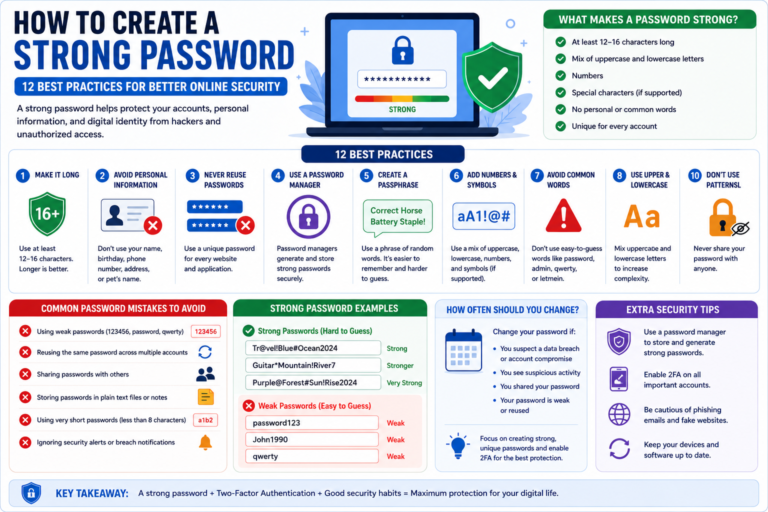
A strong password is difficult for both people and automated tools to guess. It should also be unique for every account you use.
Generally, a strong password has these characteristics:
- At least 12–16 characters long.
- A mix of uppercase and lowercase letters.
- Numbers.
- Special characters, when supported.
- No predictable words or personal information.
- Unique for every website or application.
Longer passwords usually provide better protection than short, complex ones.
12 Best Practices for Creating a Strong Password
1. Make Your Password Long
Length is one of the most important factors in password security. A password with 16 characters generally provides better protection than one with only eight characters.
2. Avoid Personal Information
Do not use information that others can easily discover, such as:
- Your name.
- Your birthday.
- Your phone number.
- Your address.
- Your pet’s name.
Attackers often search social media profiles for these details.
3. Never Reuse Passwords
If one website experiences a data breach, reused passwords may allow attackers to access your other accounts. Create a unique password for every service you use.
4. Use a Password Manager
A password manager can generate long, random passwords and store them securely, so you don’t need to remember every password yourself.
5. Create a Passphrase
Instead of using a single word, consider using several unrelated words combined into a memorable passphrase.
For example, a long phrase made from unrelated words is generally easier to remember and harder to guess than a short password.
6. Add Numbers and Symbols Naturally
If the website supports them, include numbers and special characters without relying on predictable substitutions like replacing “a” with “@”.
7. Enable Two-Factor Authentication (2FA)
Even the strongest password benefits from an additional layer of protection. Two-Factor Authentication requires a second verification step before someone can access your account.
Common Password Mistakes
Avoid these common mistakes when creating passwords:
- Using “123456” or “password”.
- Using the same password everywhere.
- Sharing passwords with others.
- Saving passwords in unsecured text files.
- Choosing very short passwords.
- Ignoring password update recommendations after a known data breach.
These habits make it easier for attackers to compromise your accounts.
How to Remember Strong Passwords
Many people avoid using strong passwords because they worry about forgetting them. Fortunately, there are safer ways to remember secure passwords without making them easier to guess.
Use a Password Manager
A password manager stores your passwords in an encrypted vault. You only need to remember one strong master password while the software securely manages the rest.
Create Memorable Passphrases
A passphrase made from several unrelated words is often easier to remember than a random string of characters while still providing strong security.
For example, combining unrelated words with numbers or symbols creates a password that’s both memorable and difficult to guess.
Avoid Writing Passwords in Plain Text
Don’t save passwords in notebooks, sticky notes attached to your computer, or unencrypted documents. If you must keep a backup, use a secure and trusted method.
How Often Should You Change Your Password?
Many websites no longer recommend changing passwords on a fixed schedule unless there’s a reason to do so.
You should consider updating your password if:
- You discover a data breach affecting one of your accounts.
- You suspect someone knows your password.
- You accidentally shared your password.
- Your account shows suspicious activity.
- Your password is weak or reused across multiple websites.
Instead of changing passwords frequently without reason, focus on using strong, unique passwords and enabling Two-Factor Authentication.
Strong Password vs Weak Password
Comparing secure and insecure password habits makes it easier to understand the difference.
| Weak Password | Strong Password |
|---|---|
| Short and simple | Long and unique |
| Uses personal information | Avoids personal details |
| Reused across multiple accounts | Different for every account |
| Easy to guess | Difficult to predict |
| Stored insecurely | Stored in a password manager |
What If Your Password Is Stolen?
If you believe your password has been exposed, act quickly to reduce the risk of unauthorized access.
- Change the password immediately.
- Update any other accounts using the same password.
- Enable Two-Factor Authentication (2FA).
- Review recent account activity.
- Sign out of active sessions if the service provides that option.
- Monitor your account for unusual activity.
Responding promptly can help prevent attackers from gaining long-term access to your accounts.
Best Practices for Password Security
Good password habits go beyond simply creating a strong password.
- Use a unique password for every account.
- Enable Two-Factor Authentication wherever available.
- Use a trusted password manager.
- Keep your devices updated.
- Avoid entering passwords on suspicious websites.
- Never share passwords through email or messaging apps.
- Review your important accounts regularly.
Combining these habits creates a much stronger defense against common cyber threats.
Frequently Asked Questions
How long should a strong password be?
Many security experts recommend using at least 12 to 16 characters. Longer passwords generally provide stronger protection.
Should every account have a different password?
Yes. Using a unique password for each account helps prevent one compromised password from exposing your other accounts.
Is a password manager safe?
Reputable password managers use strong encryption and security features to protect stored credentials. Features vary between providers, so review the latest documentation before choosing one.
Should I use a passphrase instead of a password?
A long passphrase made from unrelated words can provide excellent security while remaining easier to remember than a short, complex password.
Conclusion
Learning how to create a strong password is one of the most effective ways to protect your online accounts. Strong, unique passwords make it significantly harder for attackers to gain unauthorized access, especially when combined with Two-Factor Authentication and good cybersecurity habits.
Rather than relying on short or reused passwords, choose longer passphrases, use a trusted password manager, and review your account security regularly. As online threats continue to evolve, strong password practices remain one of the simplest and most effective ways to improve your digital security.