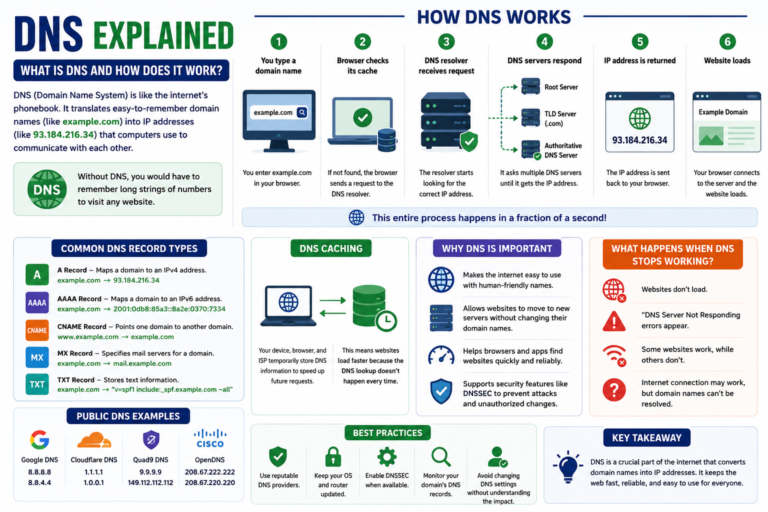
DNS explained in simple terms: the Domain Name System (DNS) acts like the internet’s phonebook. Instead of remembering long strings of numbers called IP addresses, you can type a website name such as example.com, and DNS helps your browser find the correct server.
Every time you open a website, send an email, or use many online services, DNS works behind the scenes. Although most people never notice it, DNS is one of the essential technologies that keeps the internet running smoothly.
This guide explains what DNS is, how it works, why it’s important, and how it affects your browsing experience.
What Is DNS?
DNS, short for Domain Name System, is a system that translates human-readable domain names into numerical IP addresses that computers use to communicate with one another.
For example, it’s much easier to remember example.com than an IP address like 93.184.216.34. DNS performs this translation automatically whenever you visit a website.
Without DNS, you would need to remember the IP address of every website you wanted to visit.
Why Is DNS Important?
The internet contains millions of websites and online services. DNS allows people to access them using easy-to-remember names instead of complex numerical addresses.
DNS provides several important benefits:
- Makes websites easier to access.
- Allows website owners to change servers without changing their domain names.
- Helps browsers locate websites quickly.
- Supports reliable communication across the internet.
How Does DNS Work?
Although DNS looks complicated behind the scenes, the basic process is easy to understand.
- You type a website address into your browser.
- Your browser checks whether it already knows the IP address.
- If not, it sends a DNS lookup request.
- The DNS system finds the correct IP address.
- Your browser connects to the website’s server.
- The website loads on your screen.
This entire process usually takes only a fraction of a second.
What Is a DNS Lookup?
A DNS lookup is the process of finding the IP address associated with a domain name.
Whenever your browser doesn’t already know the destination, it asks DNS servers to locate the correct address.
Once found, the browser can communicate directly with the website.
The Main Parts of DNS
DNS Resolver
The resolver receives your DNS request and begins searching for the correct IP address.
Root DNS Server
The root server directs the request toward the appropriate top-level domain.
Top-Level Domain (TLD) Server
The TLD server manages extensions such as .com, .org, .net, and many country-specific domains.
Authoritative DNS Server
This server stores the official DNS records for a domain and returns the correct IP address to complete the lookup.
What Is DNS Caching?
To improve browsing speed, devices and browsers temporarily store DNS information. This process is called DNS caching.
If you visit the same website again, your device may already know its IP address and won’t need to perform another DNS lookup immediately.
This helps websites load faster while reducing unnecessary DNS requests.
What Happens When DNS Stops Working?
When DNS experiences problems, your internet connection may still work, but websites may fail to load because your browser cannot locate their servers.
Common symptoms include:
- Websites not loading.
- “DNS Server Not Responding” errors.
- Intermittent connection problems.
- Some websites working while others fail.
Common DNS Record Types
DNS uses different types of records to perform specific tasks. Each record stores information that helps devices locate websites, email servers, and other online services.
A Record
An A record connects a domain name to an IPv4 address. It is one of the most commonly used DNS records and helps browsers find the correct web server.
AAAA Record
An AAAA record works like an A record but points to an IPv6 address instead of an IPv4 address.
CNAME Record
A Canonical Name (CNAME) record allows one domain or subdomain to point to another domain instead of an IP address.
For example, a website might point www.example.com to example.com using a CNAME record.
MX Record
Mail Exchange (MX) records tell email services where to deliver messages for a domain.
Without MX records, email delivery would not work correctly.
TXT Record
TXT records store text-based information used for verification, email security, and other services.
Many website owners use TXT records to verify domain ownership or configure email authentication technologies.
Public DNS vs Private DNS
Most people use the DNS servers provided automatically by their internet service provider. However, some users choose public DNS services for different performance, security, or privacy features.
| Feature | Public DNS | ISP DNS |
|---|---|---|
| Managed by | Third-party provider | Internet Service Provider |
| Configuration | Manual | Automatic |
| Performance | Varies by provider and location | Varies by ISP |
| Privacy Features | Depends on provider | Depends on ISP |
Performance and privacy policies differ between DNS providers, so it’s worth reviewing the latest documentation before making changes.
Can DNS Affect Internet Speed?
Yes, but only to a limited extent.
DNS mainly affects how quickly your device finds a website’s IP address. Once your browser connects to the website, download speed depends on your internet connection, the website’s server, and network conditions.
Switching to a faster DNS provider may slightly reduce the time it takes to start loading websites, but it will not significantly increase your internet speed.
How to Change Your DNS Server
Most operating systems and home routers allow you to change your DNS settings.
The general process is similar across devices:
- Open your network settings.
- Select your active internet connection.
- Locate the DNS settings.
- Choose manual configuration.
- Enter your preferred DNS server addresses.
- Save the changes and reconnect if required.
The exact steps vary depending on your operating system, device, and router model.
Common DNS Problems and Solutions
DNS Server Not Responding
This message usually means your device cannot communicate with the configured DNS server.
Restarting your router, reconnecting to the network, or trying another DNS provider may help resolve the issue.
Website Loads on Other Devices but Not Yours
This can happen if your device has stored outdated DNS information.
Clearing your DNS cache or restarting your device often fixes the problem.
Incorrect Website Loads
Misconfigured DNS records can direct visitors to the wrong server. Website owners should review their DNS settings through their domain registrar or DNS hosting provider.
Best Practices for DNS Security
While DNS works automatically for most users, following a few simple practices can improve both security and reliability.
- Keep your operating system updated.
- Use reputable DNS providers.
- Avoid changing DNS settings without understanding their purpose.
- Monitor your domain’s DNS records if you own a website.
- Enable security features offered by your DNS provider when available.
These habits help reduce configuration errors and improve the overall reliability of your internet connection.
Frequently Asked Questions
What does DNS stand for?
DNS stands for Domain Name System, a system that translates domain names into IP addresses.
Can I browse the internet without DNS?
Technically, yes, if you know the IP address of every website you want to visit. In practice, DNS makes internet browsing much easier and more convenient.
Does changing DNS improve security?
Some DNS providers offer additional security features such as malware filtering or phishing protection. However, the available features depend on the provider and may change over time.
Is DNS the same as a VPN?
No. DNS translates domain names into IP addresses, while a VPN encrypts your internet connection and routes traffic through a secure server. Although they serve different purposes, many people use both together.
Conclusion
DNS explained simply means understanding how the internet converts website names into IP addresses so your browser can locate the correct server. Every time you visit a website, DNS works behind the scenes to make the connection fast and seamless.
Although most users never need to configure DNS manually, knowing how it works can help you troubleshoot connection issues, understand website performance, and make informed decisions about your network settings. As internet technologies continue to evolve, DNS remains one of the most important building blocks of the modern web.