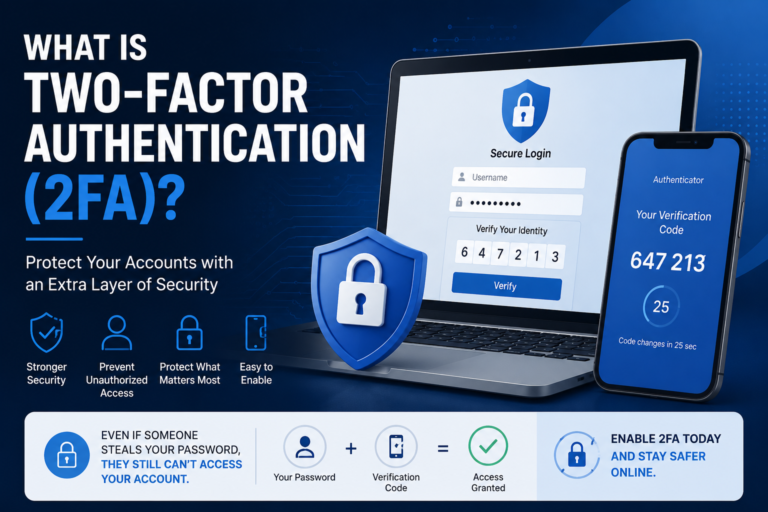
Using Two-Factor Authentication (2FA) is one of the easiest and most effective ways to improve your online security. Even if someone steals your password, 2FA adds an extra verification step that makes it much harder for attackers to access your accounts.
With cyber threats becoming more common, passwords alone are no longer enough to protect sensitive information. Data breaches, phishing scams, and password leaks can expose login credentials, putting personal and financial information at risk.
This guide explains what Two-Factor Authentication is, how it works, the different types of authentication methods, and why you should enable it wherever possible.
What Is Two-Factor Authentication (2FA)?
Two-Factor Authentication (2FA) is an additional security layer that requires two different forms of identity verification before granting access to an account.
Normally, logging into an online account only requires a username and password. With 2FA enabled, you’ll also need a second verification factor, such as a code sent to your phone or generated by an authentication app.
This means that even if someone knows your password, they still cannot sign in without the second verification method.
How Does Two-Factor Authentication Work?
Most 2FA systems follow a simple process:
- You enter your username and password.
- The website verifies your password.
- You are prompted for a second verification factor.
- You approve the login using your chosen method.
- Access is granted only after both factors are verified.
The entire process usually takes less than a minute but significantly increases account security.
The Three Authentication Factors
Authentication methods generally fall into three categories.
1. Something You Know
This includes information only you should know, such as:
- Passwords
- PIN numbers
- Security questions
This is the first factor used by almost every online service.
2. Something You Have
The second factor often involves a physical device that you possess.
Examples include:
- Authentication apps
- Hardware security keys
- Smartphones that receive verification codes
- One-time password (OTP) generators
3. Something You Are
Biometric authentication verifies your identity using physical characteristics.
Examples include:
- Fingerprint recognition
- Face recognition
- Iris scanning
Many modern smartphones combine biometrics with other authentication methods for added convenience.
Common Types of Two-Factor Authentication
SMS Verification Codes
One of the most common forms of 2FA sends a one-time code to your registered mobile number. After entering your password, you must enter the code before logging in.
Although SMS-based verification is better than using only a password, security experts generally recommend stronger alternatives because attackers may attempt SIM swapping or intercept text messages.
Authenticator Apps
Authenticator apps generate temporary verification codes that change every 30 to 60 seconds. Since the codes are generated on your device, they are generally more secure than SMS messages.
Popular authenticator apps include Google Authenticator, Microsoft Authenticator, and Authy. Features and availability may change over time as these applications receive updates.
Push Notifications
Some services send a notification to your smartphone asking you to approve or deny the login request. This method is both secure and convenient because you don’t need to type a verification code.
Hardware Security Keys
Hardware security keys are small USB or NFC devices that verify your identity during login. They provide one of the strongest forms of account protection because they require physical possession of the device.
They are commonly used by businesses, developers, and individuals who need enhanced security for important accounts.
Why Is Two-Factor Authentication Important?
Passwords can be stolen in many ways, including phishing emails, malware, reused passwords, or data breaches.
Without 2FA, anyone who knows your password may be able to access your account.
With 2FA enabled, attackers would also need access to your second authentication factor, making unauthorized access much more difficult.
Benefits of Using Two-Factor Authentication
- Provides an extra layer of account security.
- Protects against stolen passwords.
- Reduces the impact of phishing attacks.
- Helps secure banking and financial accounts.
- Protects email accounts that can be used to reset other passwords.
- Improves overall online safety.
Which Accounts Should Use 2FA?
Whenever possible, enable Two-Factor Authentication on accounts that store personal or sensitive information.
- Email accounts
- Online banking
- Cloud storage
- Social media platforms
- Shopping websites
- Password managers
- Work-related accounts
- Cryptocurrency wallets and exchanges
How to Enable Two-Factor Authentication
The exact steps vary depending on the service you’re using, but the process is generally similar across most websites and apps.
- Sign in to your account.
- Open the account or security settings.
- Look for Two-Factor Authentication, 2FA, or Two-Step Verification.
- Select your preferred verification method.
- Follow the setup instructions.
- Save the backup or recovery codes in a secure place.
- Test the login process before signing out.
Many services also allow you to trust a personal device, reducing the need to enter a verification code every time you log in.
Best Practices for Using Two-Factor Authentication
Enabling 2FA is an excellent first step, but following a few additional practices can make your accounts even more secure.
Use an Authenticator App When Possible
Authenticator apps generally offer stronger protection than SMS verification because they are less vulnerable to attacks such as SIM swapping.
Store Backup Codes Securely
Many websites provide recovery or backup codes during setup. These codes allow you to regain access if you lose your phone or authentication device.
Store them somewhere secure, such as a password manager or an offline location that only you can access.
Keep Your Contact Information Updated
If your recovery email address or phone number changes, update your account settings promptly. Outdated recovery information can make it difficult to regain access if you lose your device.
Use Strong, Unique Passwords
Two-Factor Authentication is most effective when paired with strong passwords. Avoid reusing the same password across multiple websites.
A password manager can help generate and securely store unique passwords for each account.
Be Careful with Verification Requests
If you receive a login approval request that you didn’t initiate, deny it immediately. Unexpected authentication requests could indicate that someone is trying to access your account.
Common Myths About Two-Factor Authentication
Myth 1: My Password Is Strong Enough
Even strong passwords can be exposed through phishing attacks, malware, or data breaches. Two-Factor Authentication adds an additional barrier that passwords alone cannot provide.
Myth 2: 2FA Is Too Complicated
Most authentication methods take only a few extra seconds during login. The small amount of extra time is well worth the added security.
Myth 3: Hackers Can’t Access My Account Anyway
Cybercriminals often use automated tools to target millions of accounts. Even if you don’t consider yourself a likely target, securing your accounts helps reduce unnecessary risk.
What Happens If You Lose Your Phone?
Losing the device you use for 2FA can be stressful, but most online services provide recovery options.
You may be able to regain access by using:
- Backup recovery codes
- A registered recovery email address
- A trusted device you’ve previously approved
- An alternative authentication method configured during setup
For this reason, it’s important to save recovery codes and keep your account recovery information up to date.
Frequently Asked Questions
Is Two-Factor Authentication free?
Yes. Most websites and online services offer Two-Factor Authentication at no additional cost.
Does 2FA guarantee complete protection?
No security measure can guarantee complete protection. However, 2FA significantly reduces the likelihood of unauthorized access by adding an extra verification step.
Can I use 2FA on multiple devices?
Many authenticator apps support multiple devices or secure backups. The available options depend on the app and service you use, and features may change over time.
Should I enable 2FA for every account?
It’s a good idea to enable it for any account that stores personal, financial, or work-related information. At a minimum, protect your email account, banking services, cloud storage, and password manager with 2FA.
Conclusion
Two-Factor Authentication (2FA) is one of the simplest and most effective ways to strengthen your online security. By requiring a second verification step in addition to your password, it helps protect your accounts from unauthorized access, even if your password is compromised.
Whether you choose an authenticator app, push notifications, or a hardware security key, enabling 2FA can greatly improve your digital safety. While authentication methods and security features may evolve over time, the principle remains the same: adding an extra layer of verification makes it much harder for attackers to gain access to your accounts.
If you haven’t enabled Two-Factor Authentication (2FA) yet, now is a good time to review your important online accounts and activate this valuable security feature wherever it’s available.